서울 지하철 역 좌표(위도, 경도) 파싱하기
https://observablehq.com/@taekie/seoul_subway_station_coordinate
서울 지하철역 좌표
아래 station_coordinate에 마우스를 올리면 나오는 왼쪽의 점세개를 누르면 csv,json 파일로 다운 받을 수 있는 메뉴가 나옵니다. data 서울특별시 노선별 지하철역 정보 서울 열린 데이타 광장 한글 인
observablehq.com
station_coordinate.json
0.06MB
서울 지하철 역 좌표를 나타내는 station_coordinate.json은 위의 링크에서 확인할 수 있다.
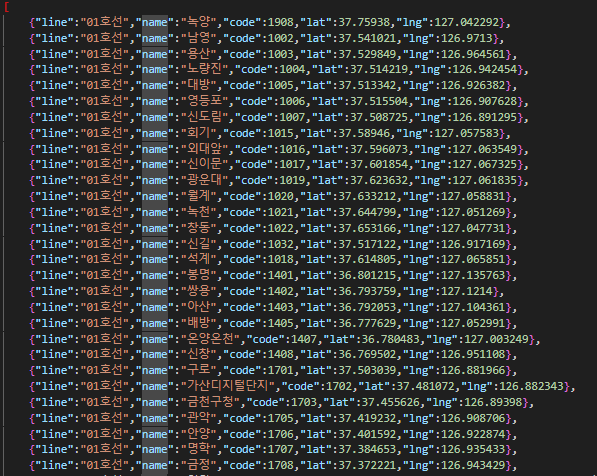
지하철 역 정보(json) 파일의 형식은 다음과 같다.
- line 정보
- name
- code
- lat(위도)
- lng(경도)
위의 json 파싱을 위해 Gson 라이브러리를 활용했으며, 파싱 코드는 다음과 같다. Gson 라이브러리 사용을 위해서는 pom.xml에 gson을 위한 의존성 주입을 선행적으로 수행해야 한다.
package station_test;

import com.google.gson.Gson;
import com.google.gson.reflect.TypeToken;
import java.io.FileReader;
import java.io.IOException;
import java.lang.reflect.Type;
import java.util.List;

public class Jsonparser {

	 public static void main(String[] args) {
	        try {
	            // JSON 파일을 읽어옴
	            FileReader reader = new FileReader("src/station_coordinate.json");

	            // Gson 객체 생성
	            Gson gson = new Gson();

	            // JSON을 List<Station> 객체로 파싱
	            Type stationListType = new TypeToken<List<Station>>(){}.getType();
	            List<Station> stations = gson.fromJson(reader, stationListType);

	            // 파싱된 결과 출력
	            for (Station station : stations) {
	                System.out.println("Line: " + station.getLine());
	                System.out.println("Name: " + station.getName());
	                System.out.println("Code: " + station.getCode());
	                System.out.println("Latitude: " + station.getLat());
	                System.out.println("Longitude: " + station.getLng());
	                System.out.println();
	            }

	            // 파일 읽기 종료
	            reader.close();
	        } catch (IOException e) {
	            e.printStackTrace();
	        }
	    }

	    // Station 클래스 정의
	    static class Station {
	        private String line;
	        private String name;
	        private int code;
	        private double lat;
	        private double lng;

	        // Getter 메서드
	        public String getLine() {
	            return line;
	        }

	        public String getName() {
	            return name;
	        }

	        public int getCode() {
	            return code;
	        }

	        public double getLat() {
	            return lat;
	        }

	        public double getLng() {
	            return lng;
	        }
	    }

}
파싱한 결과를 데이터베이스에 넣기(java & MySQL)
파싱한 결과를 mysql에 넣어보자.
<pom.xml>
<project xmlns="http://maven.apache.org/POM/4.0.0" xmlns:xsi="http://www.w3.org/2001/XMLSchema-instance" xsi:schemaLocation="http://maven.apache.org/POM/4.0.0 https://maven.apache.org/xsd/maven-4.0.0.xsd">
  <modelVersion>4.0.0</modelVersion>
  <groupId>station_test</groupId>
  <artifactId>station_test</artifactId>
  <version>0.0.1-SNAPSHOT</version>
  <build>
    <sourceDirectory>src</sourceDirectory>
    <plugins>
      <plugin>
        <artifactId>maven-compiler-plugin</artifactId>
        <version>3.8.1</version>
        <configuration>
          <release>17</release>
        </configuration>
      </plugin>
    </plugins>
  </build>
  <dependencies>
	  	<dependency>
		    <groupId>com.google.code.gson</groupId>
		    <artifactId>gson</artifactId>
		    <version>2.10.1</version>
		</dependency>
		<dependency>
			<groupId>com.mysql</groupId>
			<artifactId>mysql-connector-j</artifactId>
			<version>8.0.33</version>
		</dependency>
	</dependencies>
</project>
<Station.java>
package dto;

public class Station {
    private String line;
    private String name;
    private int code;
    private double lat;
    private double lng;

    public Station() {}

	public Station(String line, String name, int code, double lat, double lng) {
		super();
		this.line = line;
		this.name = name;
		this.code = code;
		this.lat = lat;
		this.lng = lng;
	}

	public String getLine() {
		return line;
	}

	public void setLine(String line) {
		this.line = line;
	}

	public String getName() {
		return name;
	}

	public void setName(String name) {
		this.name = name;
	}

	public int getCode() {
		return code;
	}

	public void setCode(int code) {
		this.code = code;
	}

	public double getLat() {
		return lat;
	}

	public void setLat(double lat) {
		this.lat = lat;
	}

	public double getLng() {
		return lng;
	}

	public void setLng(double lng) {
		this.lng = lng;
	}

	@Override
	public String toString() {
		return "Station [line=" + line + ", name=" + name + ", code=" + code + ", lat=" + lat + ", lng=" + lng + "]";
	}

}
<StationDao.java>
package dao;

import java.sql.SQLException;

import dto.Station;

public interface StationDao {
	public boolean addStation(Station station) throws SQLException;
	public Station getStation(String name) throws SQLException;
}
<StationDaoImpl.java>
package dao;

import java.sql.Connection;
import java.sql.PreparedStatement;
import java.sql.SQLException;

import dto.Station;
import util.DBUtil;

public class StationDaoImpl implements StationDao {

	private static StationDaoImpl instance = new StationDaoImpl();
	private static DBUtil util = DBUtil.getInstance();

	public static StationDaoImpl getInstance() {
		return instance;
	}


	@Override
	public boolean addStation(Station station) throws SQLException {

		Connection conn = null;
		PreparedStatement pstmt = null;

		try {
			conn = util.getConnection();
			String sql = " INSERT INTO station (Line, Name, Code, Lat, Lng) values(?, ?, ?, ?, ?) ";

			pstmt = conn.prepareStatement(sql.toString());
			pstmt.setString(1, station.getLine());
			pstmt.setString(2, station.getName());
			pstmt.setInt(3, station.getCode());
			pstmt.setDouble(4, station.getLat());
			pstmt.setDouble(5, station.getLng());

			return 0 < pstmt.executeUpdate();
		} finally {
			util.close(conn, pstmt);
		}
	}

	@Override
	public Station getStation(String name) throws SQLException {
		// TODO Auto-generated method stub
		return null;
	}

}
MySQL query
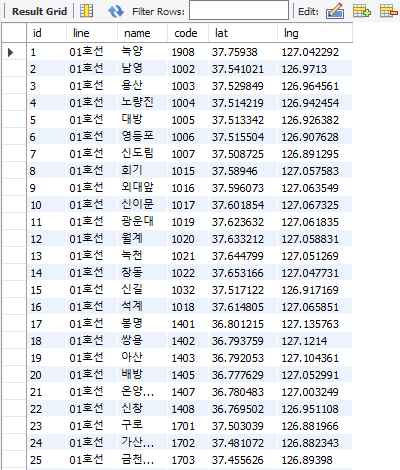
CREATE TABLE IF NOT EXISTS `ssafyhome`.`station` (
    id INT AUTO_INCREMENT,
    line VARCHAR(255),
    name VARCHAR(255),
    code INT,
    lat DOUBLE,
    lng DOUBLE,
  PRIMARY KEY (`id`))
ENGINE = InnoDB
DEFAULT CHARACTER SET = utf8mb4
COLLATE = utf8mb4_0900_ai_ci;
<결과>
'Programming Language > JAVA' 카테고리의 다른 글
| [프로그래머스] 순위검색 - 2021 KAKAO BLIND RECRUITMENT (0) | 2024.04.08 |
|---|---|
| 'The package java.sql is not accessible' 해결 (0) | 2024.03.14 |
| [Java] BFS vs DFS (0) | 2024.02.20 |
| [Java] 순열 - 조합 - 부분집합 정리 (0) | 2024.01.31 |
| [Java] Call by Value, Call by Reference (0) | 2024.01.18 |